
To enable HeadQ on your website, you need to add a small script snippet to your site’s code. This snippet ensures that all HeadQ features — including normal purchasing flows, product finders, configurators, and quote carts — load and function correctly.
We recommend installing the snippet site-wide, but at minimum it must be added to every page where you plan to use HeadQ.
Recommended Installation Method
The most reliable way to install the HeadQ snippet is to place it directly in your website’s:
-
Header (preferred), or
-
Footer
Installing the snippet directly in your site’s code ensures it loads consistently for all users.
Why not use a tag manager?
While it’s technically possible to install the snippet using tools like Google Tag Manager, some ad blockers can prevent tag-loaded scripts from running. Installing the snippet directly avoids this issue and guarantees stable performance.
Where to Find Your HeadQ Snippet
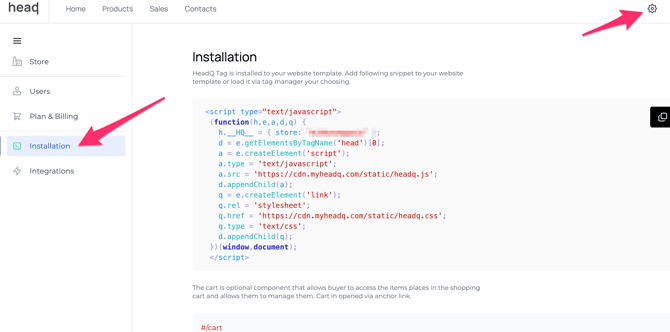
You can copy your unique snippet directly from your HeadQ Store settings:
-
Log in to your HeadQ Admin.
-
Navigate to Settings → Installation
-
Copy the code block provided.
This code is unique to your store and must not be modified.
HeadQ Cookie: Set as Functional
In addition to installing the script, the HeadQ cookie should be set as a functional cookie. This is because HeadQ is critical to your website’s functionality—without it, key features such as the product configurator, pricing, and purchase flows will not work. Functional cookies are essential for the basic operation of the website and its features, so marking HeadQ’s cookie this way ensures it is not blocked by default privacy settings or consent banners, allowing HeadQ to operate reliably for all users.