
The Save & Share configuration feature allows customers to save their current configuration and continue it later or share it with others using a unique link. This makes collaboration easier and helps customers return to their configuration without starting over.
Available with any of the following subscriptions: Growth, Enterprise.*
*paid add-on
How it works
The feature is configurator-specific, meaning it must be enabled separately for each CPQ where you want to use it.
When Save & Share is enabled, a Save icon appears in the configurator Ribbon.  When the customer clicks the icon, a popup opens where they can:
- View their current configuration
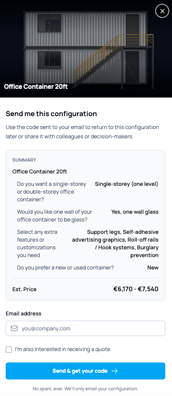
- See the price, if pricing is enabled
- Enter their email address
- Receive a code by email that allows them to return to the same configuration later
The popup can also include an option to send a quote request directly from the saved configuration.
This makes the feature especially useful for longer or more complex buying processes where customers may want to continue later or share the configuration internally.
Each saved configuration remains active for 90 days from the moment it is created. After that, the configuration link and code will expire automatically.
Lead generation
When a customer sends the configuration code to their email address, HeadQ automatically generates a lead from the submission.
The lead includes the saved configuration and customer email address, allowing sales teams to follow up and continue the sales process directly from the saved configuration.
How to enable
You can enable the feature from the CPQ Ribbon settings located on the right-hand side of the editor.
Navigate to:
CPQ → Ribbon 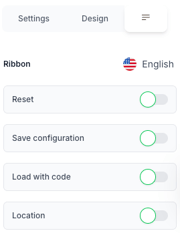
When you enable Save configuration, additional settings will appear where you can customize the popup and Ribbon texts.
Available settings include:
- Tooltip text for the Ribbon
- Popup Heading
- Popup Description
- Summary label
- Price label
- Email label
- Email placeholder
- Quote checkbox label
- Quote hint
- Button text
- Action hint
Load configuration with code
The Ribbon settings also include an option called Load with code.
When enabled, customers can return to a previously saved configuration using the code sent to their email address.
We strongly recommend enabling both Save configuration and Load with code together. This creates a smooth experience where customers can easily continue their previous configuration without starting over.
Recommendation
Save & Share works especially well for configurable B2B products where multiple stakeholders may be involved in the buying process.
We recommend placing the feature in configurators where:
- Customers may need time before making a decision
- Configurations are complex or lengthy
- Buyers often share configurations internally
- Quote requests are part of the sales process